Browse Apps
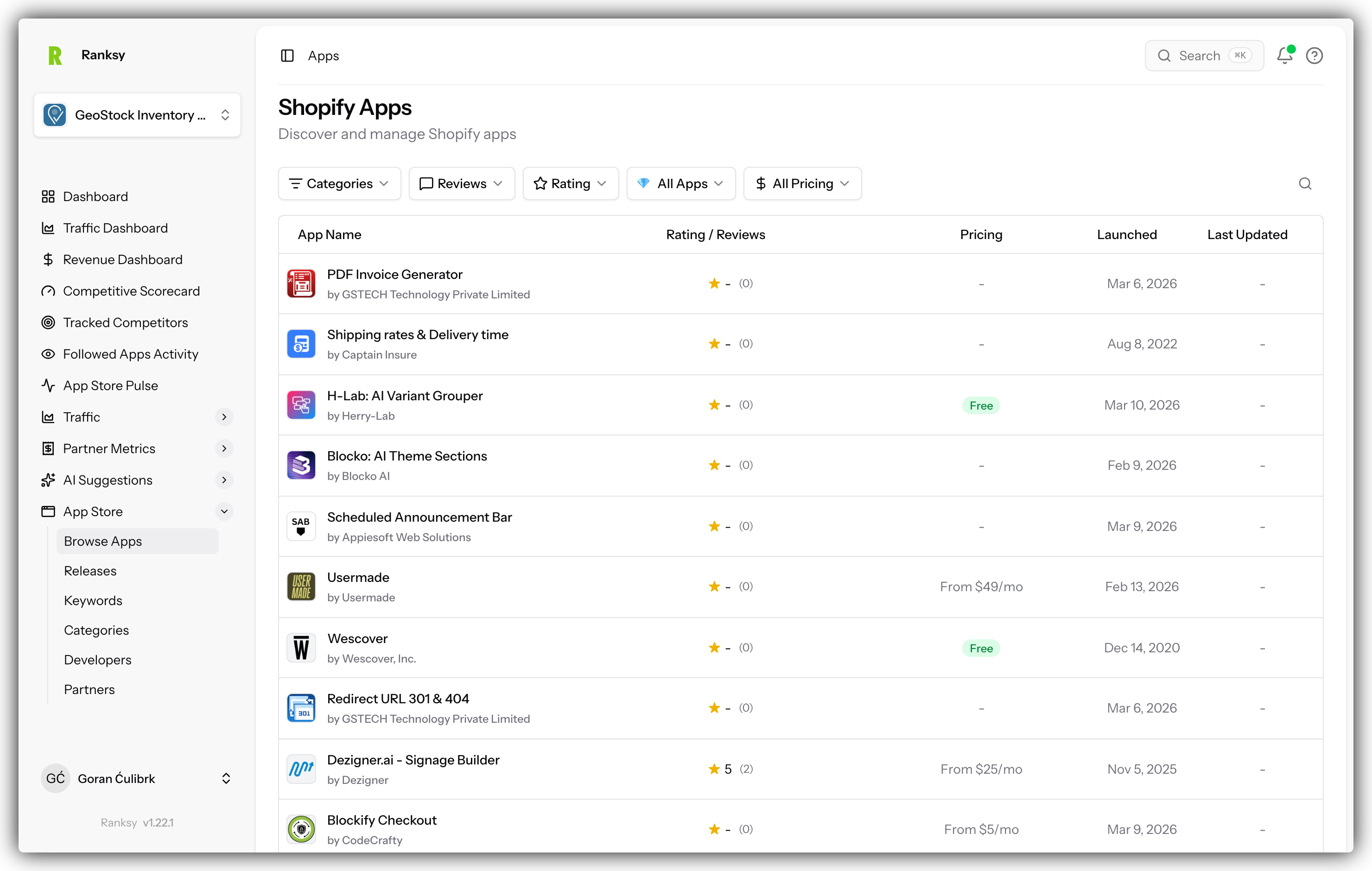
Browse Apps gives you access to Ranksy's complete Shopify App Store database. Research competitors, discover market opportunities, and find apps to follow.
Accessing Browse Apps
Click Apps in the main navigation to open the app browser.
Search and Filter
Search Bar
Search across the entire app database:
- App names
- Developer names
- Keywords in descriptions
Results appear as you type.
Filter Options
Narrow your search with filters:
By Category
- Select one or more categories
- Find apps in your space
- Explore adjacent categories
By Pricing
- Free apps
- Paid apps
- Freemium (free + paid tiers)
- Specific price ranges
By Rating
- Minimum star rating
- Top-rated apps only
By Review Count
- Minimum reviews
- Find established apps
- Find newer apps
By Last Updated
- Recently updated
- Specific date ranges
App Cards
Information Displayed
Each app card shows:
| Element | Description |
|---|---|
| App Icon | Visual identifier |
| App Name | Official app name |
| Developer | Publisher name |
| Rating | Star rating (1-5) |
| Review Count | Number of reviews |
| Categories | Primary categories |
| Pricing | Free, Paid, or Freemium |
| Actions | Follow, View Details |
Quick Actions
From any app card:
- Follow: Add to your followed apps
- View: Open full app details
- Compare: Add to comparison (if available)
App Details Page
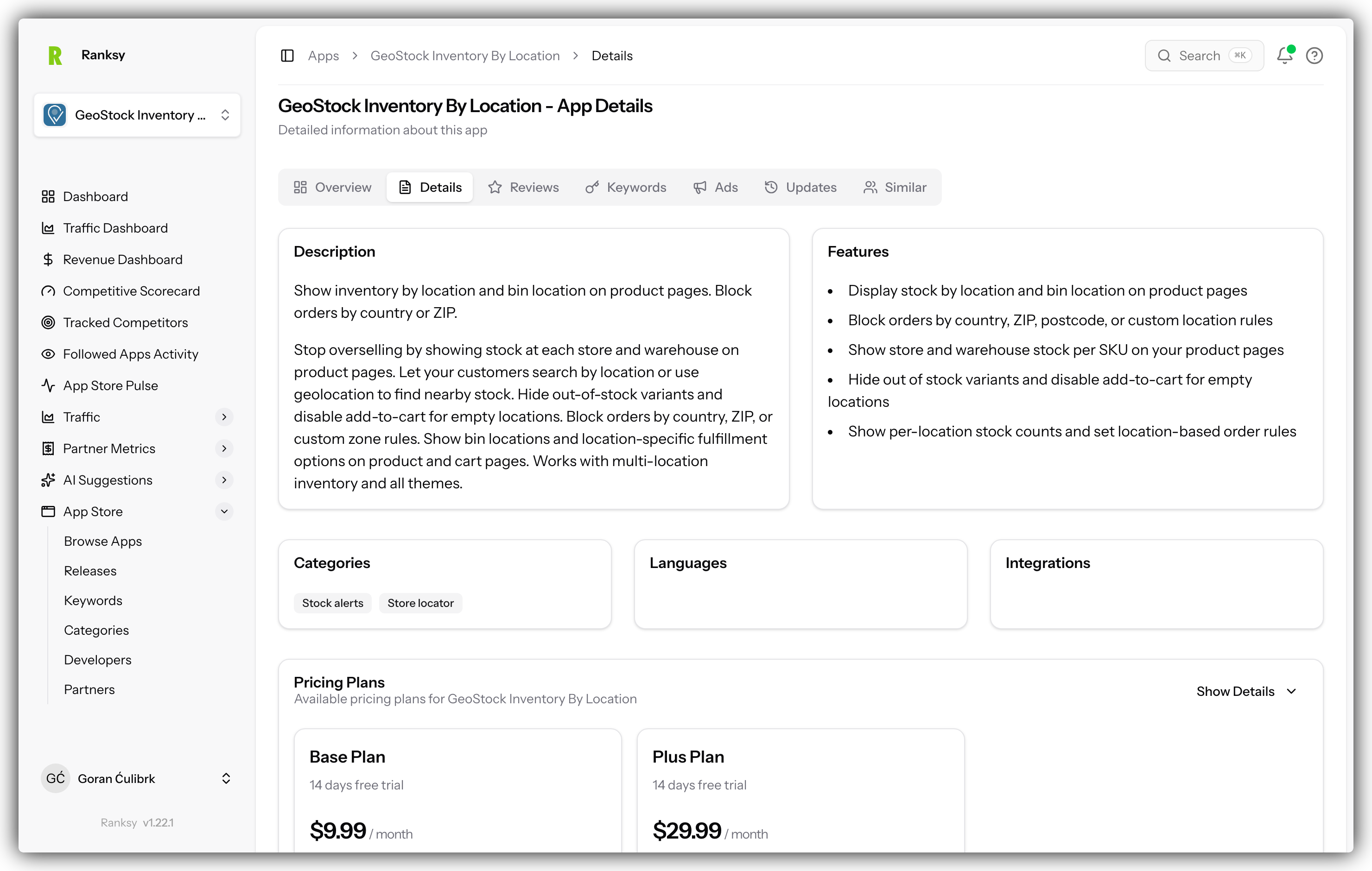
Accessing Details
Click any app card to view full details.
Overview Section
- Full app description
- All screenshots
- Complete feature list
- Pricing details
- Developer information
Rankings Tab
See where the app ranks:
- Category rankings (all categories)
- Keyword rankings (tracked keywords)
- Historical ranking trends
- Position changes over time
Reviews Tab
Explore the app's reviews:
- Recent reviews
- Rating distribution
- Review sentiment
- Common themes
Analytics Tab (Followed Apps)
For apps you follow:
- Traffic estimates
- Install trends
- Competitive metrics
Following Apps
Why Follow Apps
Following apps lets you:
- Track their rankings over time
- Monitor their updates
- Compare against your apps
- Get competitive insights
How to Follow
- Find the app you want to follow
- Click the Follow button
- The app appears in your Followed Apps
Managing Followed Apps
View all followed apps:
- Go to Apps > Followed
- See all apps you're tracking
- Unfollow apps you no longer need
Use Cases
Competitive Research
Find and analyze your competitors:
- Search your category
- Filter by similar pricing
- Review top-rated apps
- Follow key competitors
Market Research
Discover market opportunities:
- Explore categories
- Look for gaps (few apps, high demand)
- Find underserved niches
- Identify trends
Inspiration
Learn from successful apps:
- Find top performers
- Study their listings
- Analyze their reviews
- Note their strategies
Partnership Discovery
Find complementary apps:
- Search related categories
- Find non-competing apps
- Identify integration opportunities
- Reach out to developers
Sorting Options
Sort By
- Relevance: Best match for search
- Rating: Highest rated first
- Reviews: Most reviews first
- Recently Updated: Latest updates first
- Name: Alphabetical order
Pagination
Navigating Results
- Results are paginated
- Use page numbers or arrows
- Adjust results per page
Result Counts
See total matching apps at the top of results.
Tips for Effective Browsing
Research Workflow
- Start Broad: Search your main category
- Apply Filters: Narrow by pricing, rating
- Review Results: Scan app cards
- Deep Dive: Click interesting apps
- Follow Key Apps: Build your tracking list
- Compare: Analyze against your app
Finding Competitors
Look for apps that:
- Share your categories
- Target similar merchants
- Offer comparable features
- Have similar pricing
Discovering Opportunities
Look for:
- High-demand categories with few apps
- Low-rated apps (room to do better)
- Apps with common complaints (problems to solve)
- Missing features across category
FAQ
Q: How many apps are in the database? A: We track all apps in the Shopify App Store, updated daily.
Q: Can I export app lists? A: Export functionality is available for followed apps.
Q: How current is the data? A: App data syncs daily. Rankings update daily.
Q: Can I search by developer? A: Yes, search includes developer names.
Q: Is there a limit to followed apps? A: Limits depend on your plan. Check your account for details.
Q: Can I see historical data for any app? A: Full historical tracking requires following the app. Recent data available for all.
Found a competitor? Follow them and check Competitive Intelligence for in-depth analysis.