Customer Management
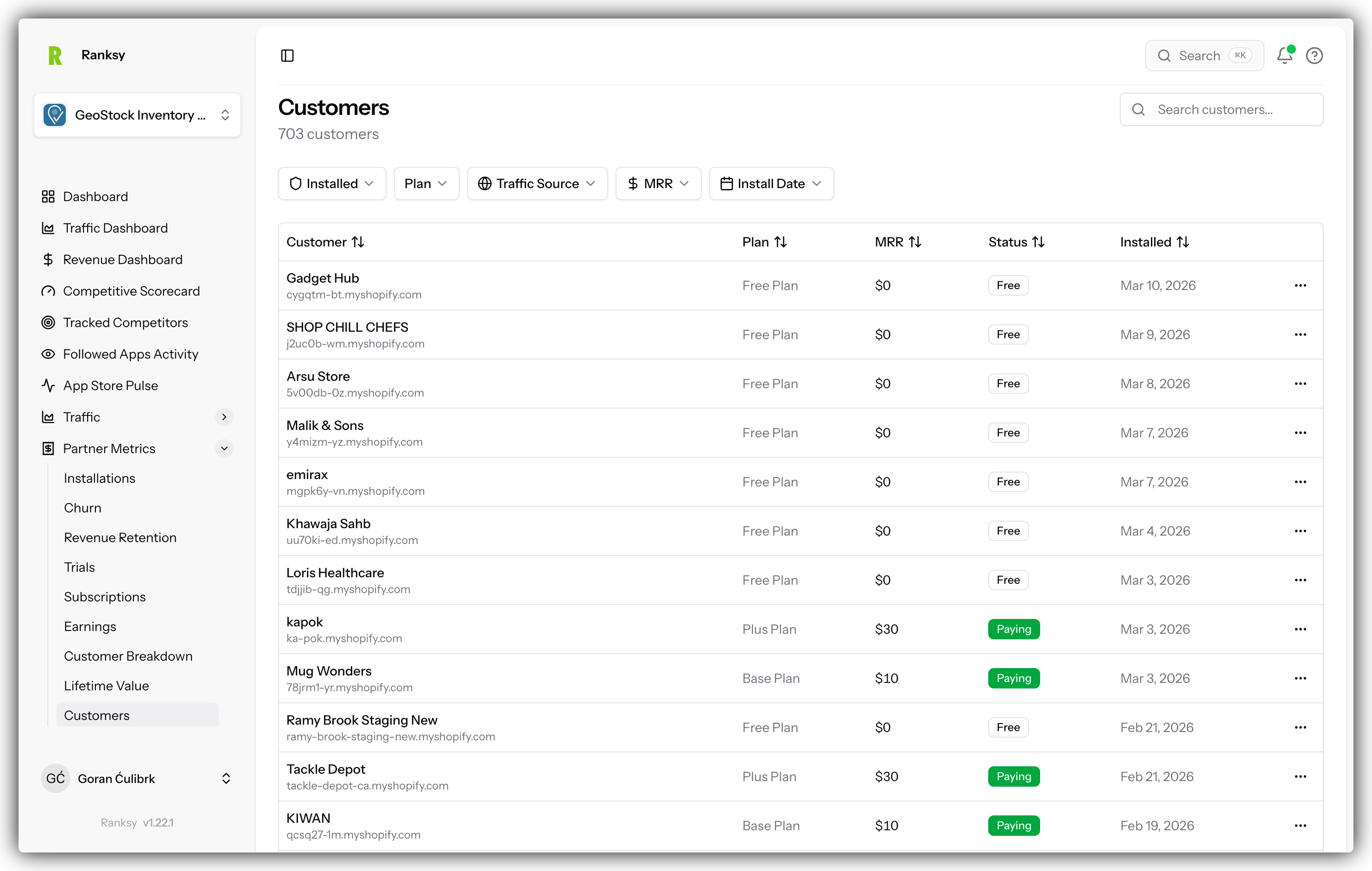
Customer Management (CRM) gives you complete visibility into your merchants, their subscriptions, and transaction history - all synced from your Shopify Partner API.
Prerequisites
Before using Customer Management, you need:
- Partner API Connected - Connect your Shopify Partner API
- Initial Sync Complete - Wait for customer data to sync
If you haven't set this up yet, see Connect Partner API.
Accessing Customer Management
- Go to My Apps and select your app
- Click Customers in the sidebar navigation
- Your customer database will load
Customer Database
Master Customer List
The main table shows all your customers with:
| Column | Description |
|---|---|
| Shop | Store name and domain |
| Contact email address | |
| Status | Active, Trial, Cancelled |
| Plan | Current subscription tier |
| MRR | Monthly recurring revenue |
| Country | Store location |
| Installed | Installation date |
| Last Active | Most recent activity |
Table Features
- Sort: Click any column header
- Paginate: Navigate through pages
- Search: Find specific customers
- Click: View full customer profile
Filtering Customers
Filter Options
By Status
- Active customers (paying)
- Trial users
- Churned/cancelled
- All statuses
By Plan
- Select specific plan tiers
- Free vs paid
- Enterprise accounts
By Country
- Geographic filtering
- Regional analysis
By MRR Range
- Minimum MRR threshold
- Maximum MRR threshold
- Find high-value customers
By Date
- Install date range
- Last activity range
Combining Filters
Apply multiple filters to create segments:
- "Active customers on Pro plan in US"
- "Trial users installed this week"
- "Churned customers with MRR > $50"
Searching Customers
Real-time Search
Type to search across:
- Shop name
- Domain
- Email address
Results appear as you type with debounced performance.
Quick Lookup
Use search for:
- Finding a specific customer
- Looking up by domain
- Searching by email
Customer Profiles
Accessing a Profile
Click any customer row to open their full profile.
Profile Header
- Shop name and logo
- Current status badge
- Contact information
- Customer since date
Key Metrics Cards
- Current MRR: Monthly revenue from this customer
- Lifetime Value: Total revenue ever
- Days as Customer: Subscription duration
- Current Plan: Active subscription tier
Subscription Timeline
Visual timeline showing:
- Initial installation
- Trial start/end dates
- Plan activations
- Upgrades and downgrades
- Pauses or cancellations
- Reactivations
Click any event for details.
Transaction History
Complete payment record:
- Transaction date
- Amount charged
- Payment status
- Invoice links (when available)
Sort by date or amount, filter by status.
MRR Chart
Line chart showing:
- MRR changes over time
- Annotations for plan changes
- Visual indicators for upgrades/downgrades
Customer Segments
Pre-built Segments
VIP Customers
- High MRR (top 20%)
- Long tenure (>6 months)
- High engagement
At-Risk Customers
- Decreasing activity
- Failed payments
- Low engagement signals
Growth Prospects
- Mid-tier plans
- High engagement
- Upgrade potential
New Customers
- Recent installs (<30 days)
- Onboarding phase
Using Segments
Segments help you:
- Target communications
- Create custom offers
- Plan retention campaigns
- Identify upsell opportunities
Customer Analytics
Acquisition Metrics
- New customers today
- New customers this week
- Customer growth rate
- Acquisition trends
Retention Metrics
- Active customer count
- Retention rate
- Average lifetime
- Reactivation rate
Revenue Metrics
- Total MRR from customers
- Average MRR per customer
- Revenue retention rate
- Expansion revenue
Best Practices
Daily Tasks
- Check for new customers
- Review payment failures
- Monitor at-risk alerts
Weekly Tasks
- Customer health review
- Segment analysis
- Outreach planning
Monthly Tasks
- Cohort analysis
- Retention initiatives
- Expansion opportunities
- Win-back campaigns
Customer Success Tips
Do
- Review customer list weekly
- Proactively reach out to at-risk customers
- Celebrate customer milestones
- Segment for personalization
- Track customer feedback
Don't
- Ignore churn signals
- Treat all customers equally
- Only react to problems
- Miss payment failures
- Neglect long-term customers
Exporting Data
Export Options
Export customer data for:
- External CRM import
- Email marketing lists
- Custom analysis
- Reporting
Export Formats
- CSV download
- Filtered exports (current view)
- Full database export
FAQ
Q: How often does customer data sync? A: Daily automatic syncs. Manual sync available in Settings.
Q: Can I add notes to customers? A: Customer notes are on our roadmap. Currently, view-only.
Q: Why is a customer missing? A: Check if they're filtered out. Otherwise, wait for next sync.
Q: Can I email customers from Ranksy? A: Not directly. Export emails for your email marketing tool.
Q: How is lifetime value calculated? A: Sum of all successful transactions from this customer.
Q: Can I track customer health scores? A: Health indicators are shown based on activity and payment patterns.
Want to reduce churn? Use customer insights with Revenue Dashboard to identify patterns and improve retention.