Set Up an Affiliate Program
An affiliate program pays people who recommend your app. Ranksy gives each affiliate a referral link for each app, credits the installs those links bring, and works out the commission under your rules. You pay affiliates yourself, outside Ranksy. Ranksy keeps the record.
Get access
The affiliate program is open to every Ranksy team. Open Affiliates in the Ranksy sidebar to get started.
Team members need permissions:
| Permission | What it allows |
|---|---|
| Affiliates | Create and edit programs, invite and approve affiliates, add referrals, cancel commissions |
| Affiliate payouts | Open the Payouts tab, mark payouts paid, void, reopen and hold payouts, add manual commissions and opening balances, see full bank details |
Team owners have both. Set them under Settings > Team.
Before you start
Ranksy can only credit installs it can trace back to an affiliate's link. Each app in the program needs:
- The Shopify Partner API, so Ranksy sees installs and charges. Every commission is calculated from a Partner API charge.
- One way to match installs to links: GA4 data in BigQuery, or calls to the
/identifyendpoint from your app.
The Tracking setup card on each program shows what's connected and what's missing. See Affiliate Tracking Prerequisites.
Create a program
- Go to Affiliates and open the Programs tab.
- Click New program.
- Enter a name (for example, "YouTube creators") and select the apps the program covers.
- Click Create program.
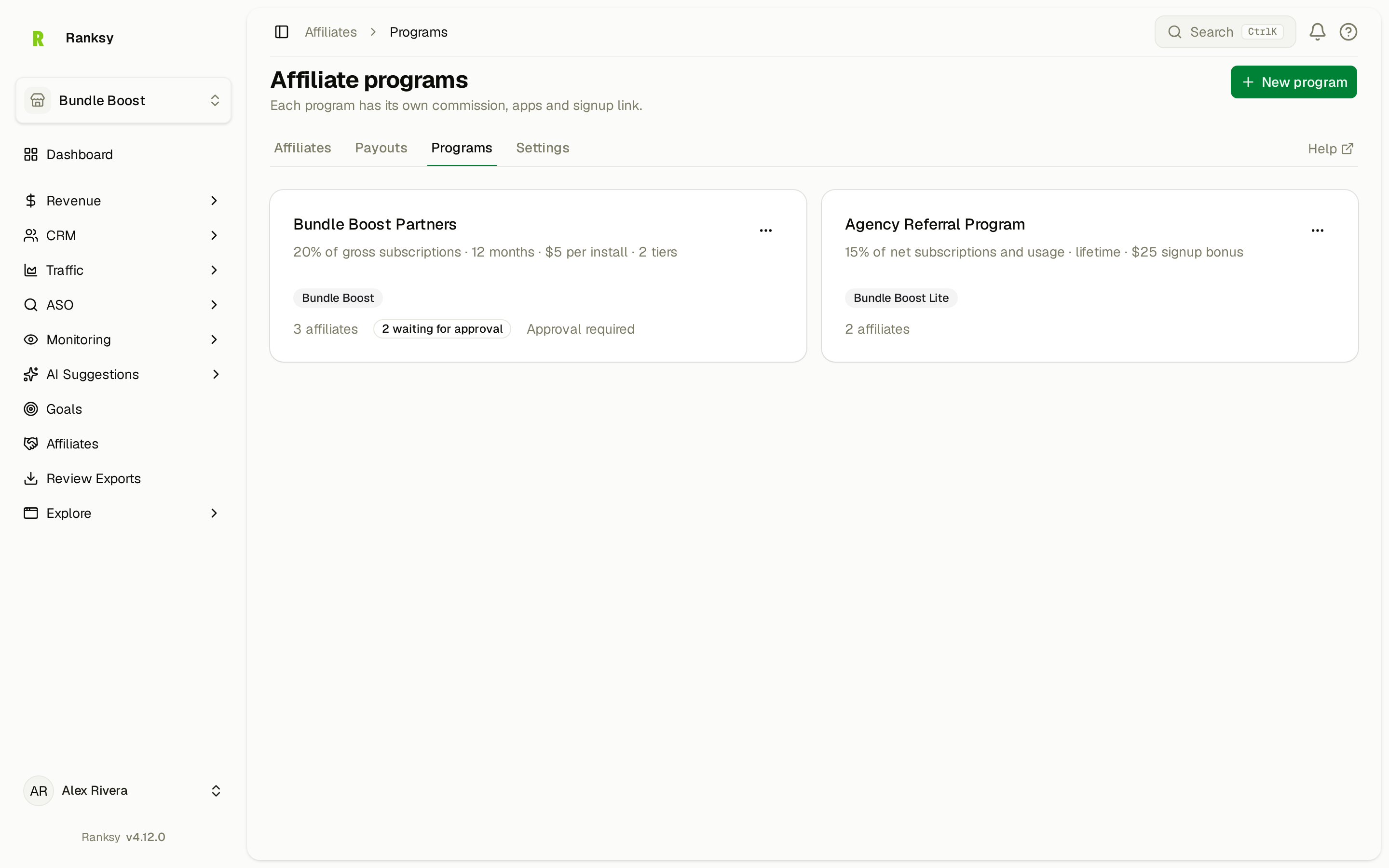
Ranksy opens the program on its Commission & tiers tab. A new program starts at 20% of gross subscription revenue for the customer's lifetime, with no minimum payout. Set your own terms before you invite anyone.
You can run several programs, for example one for agencies and one for creators, each with its own terms. An app can belong to more than one program.
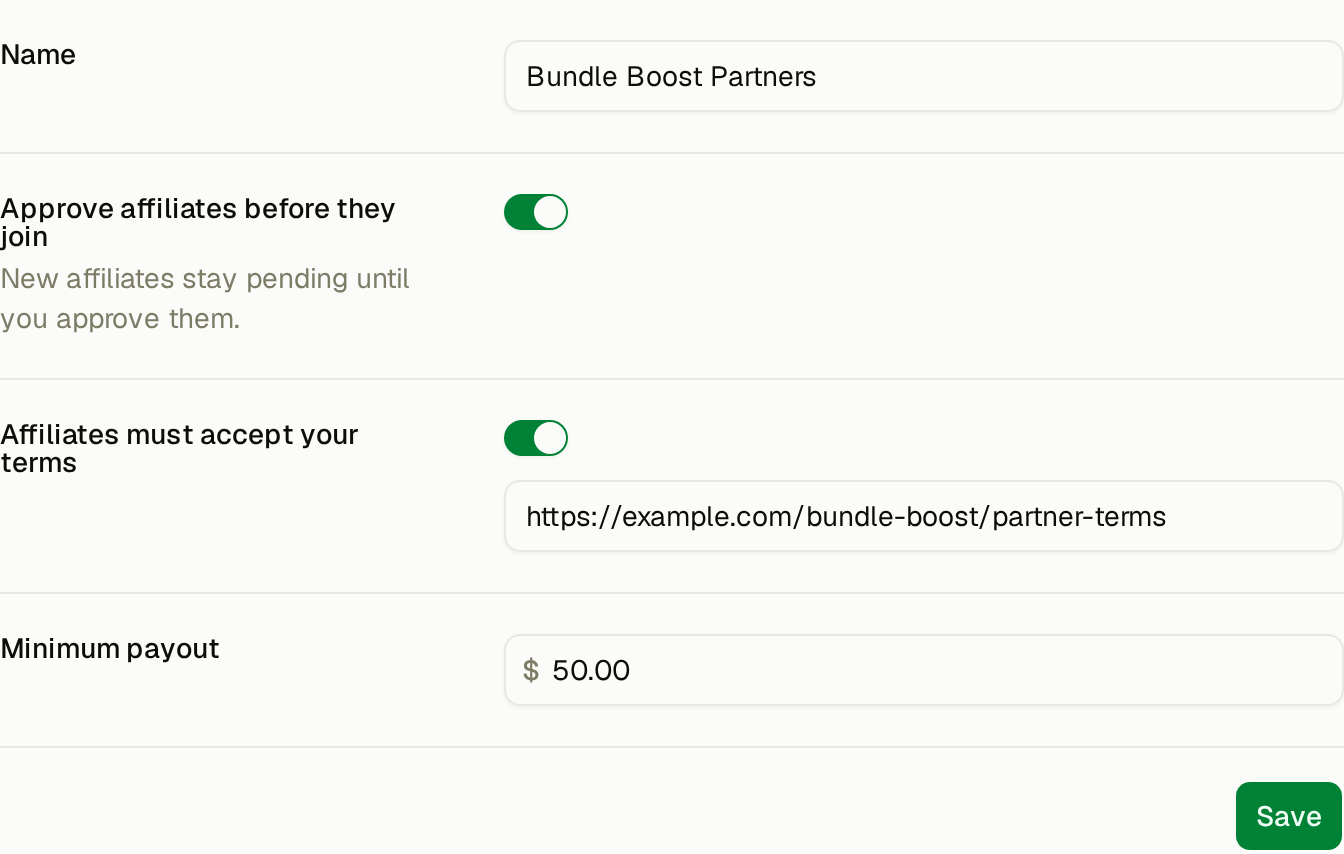
General
The Tracking setup card sits at the top of this tab.
| Setting | What it does |
|---|---|
| Name | The program name affiliates see in their portal and emails. |
| Approve affiliates before they join | New affiliates stay pending until you approve them. |
| Affiliates must accept your terms | Add a link to your terms. Affiliates must accept them before they get their links. If you change the link later, affiliates must accept the new version before their links show again. |
| Minimum payout | Ranksy starts a payout only when an affiliate's unpaid commission in this program reaches this amount. Leave it at 0 to pay any balance. |
Commission & tiers
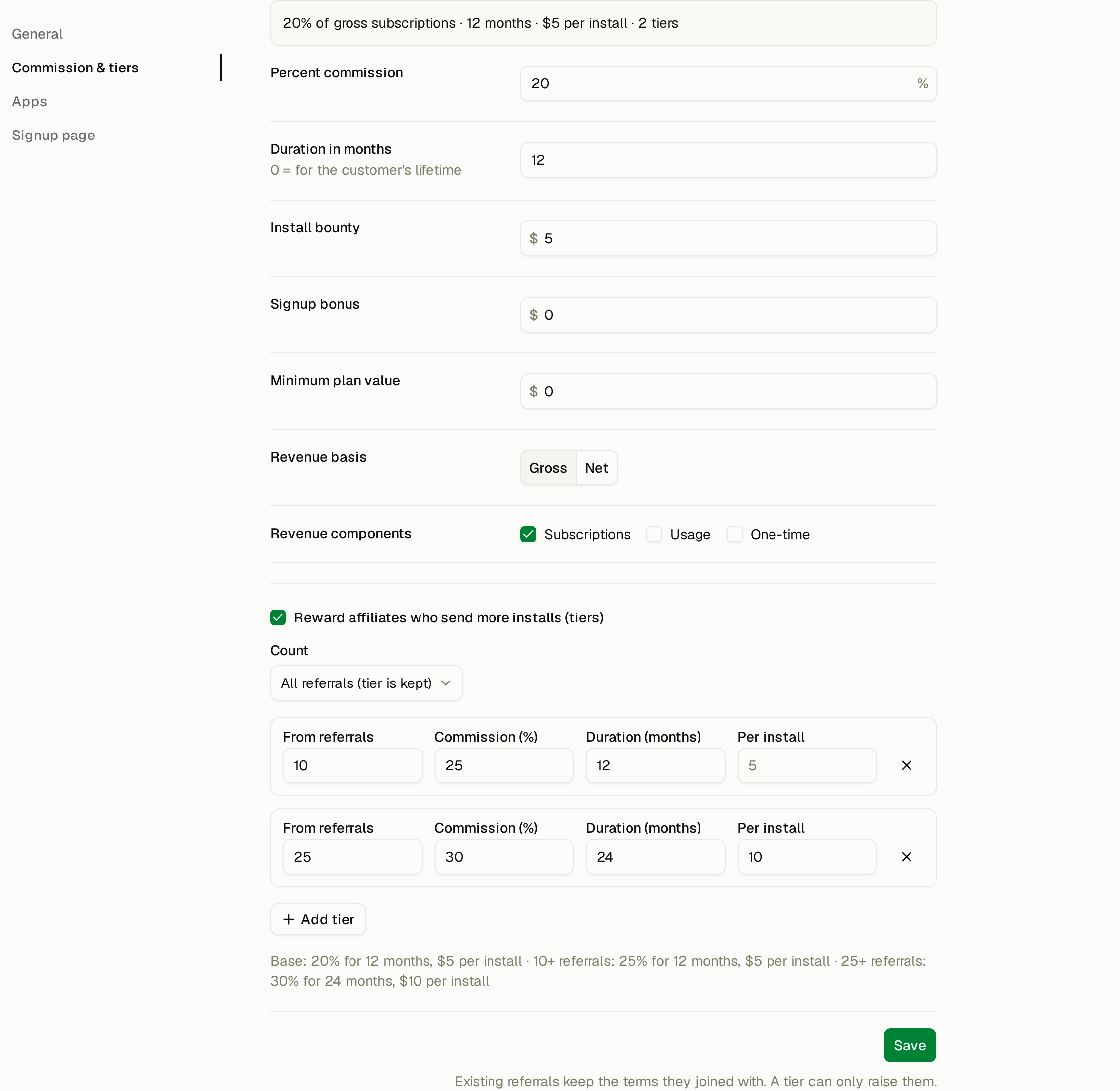
The box at the top sums up your terms in one line, for example "30% of gross subscriptions · 12 months · $5 per install".
| Setting | What it does |
|---|---|
| Percent commission | The share of each eligible payment a referred merchant makes. |
| Duration in months | How long the percent commission runs, counted from the merchant's first payment after the referral. 0 means for the customer's lifetime. |
| Install bounty | A fixed amount for each referred install. |
| Signup bonus | A one-time amount on the merchant's first payment after the referral. |
| Minimum plan value | The percent commission and the signup bonus count only when the merchant's subscription is at least this amount. |
| Revenue basis | Gross is the full charge. Net is what you receive after Shopify's share. |
| Revenue components | The charge types that earn commission: Subscriptions, Usage and One-time. |
All amounts are in USD. Ranksy pays commission only on payments made after the referral. Test store installs never earn commission.
Changing terms
Each referral keeps the terms that applied when Ranksy credited it. If you change the commission later, the new terms apply to referrals credited from then on. Existing referrals keep their terms.
Tiers
Tiers raise commission for affiliates who send more referrals.
- Check Reward affiliates who send more installs (tiers).
- Under Count, choose how referrals are counted:
- All referrals (tier is kept): every referral counts, so an affiliate never drops a tier.
- Installed referrals (tier can drop): only referrals that still have the app installed count.
- For each tier, set From referrals and the terms for that tier: Commission (%), Duration (months) and Per install. Leave a field empty to keep the value from the tier below.
- Click Add tier for more. A program can have up to 5 tiers.
A tier applies to payments made after the affiliate reaches it. Tiers apply to existing referrals too, but they only ever raise terms. A tier never lowers or shortens the terms a referral joined with. Signup bonus, minimum plan value and revenue settings are the same for every tier.
Apps
Select the apps in the program and click Save. Each affiliate gets one referral link per app. An app needs a public App Store listing to have a referral link. Under each app, Ranksy shows which other programs include it.
Signup page
Every program has a public signup page, ready from the moment you create the program. Its address ends in /affiliate-signup/<slug>.
- Open the Signup page tab.
- Change the Signup slug to something readable if you like. Use lowercase letters, numbers and dashes. The slug must be unique.
- Click Save.
- Copy the link from Signup link, or click Copy signup link at the top of the page.
If approval is on, people who sign up through this page wait for you to approve them. See Invite and Approve Affiliates.
Payout methods
Payout methods apply to every program. Set them under Affiliates > Settings. See Pay Affiliates.
Archive a program
Click Archive on the program page, then Archive program. The signup link stops working and the program's links stop getting new referrals. Affiliates keep earning on the customers they already referred. You can't undo this.
If the affiliate program is paused for your team
If the affiliate program is turned off for your team after you've used it, Ranksy pauses it. While it's paused:
- No new affiliates, referrals or commissions are added.
- The signup page shows the program as paused.
- Only the Payouts page stays open, so you can still pay what affiliates have earned.
When the program is turned back on, Ranksy adds the commissions for payments made during the pause.
FAQ
Q: Does Ranksy send money to affiliates? A: No. You pay affiliates yourself, then mark each payout paid in Ranksy.
Q: Can I change commission after affiliates join? A: Yes. New terms apply to referrals credited after the change. Referrals you already have keep their terms, and commissions already earned don't change.
Q: Can I give an affiliate credit for a shop they referred before I used Ranksy? A: Yes. On the affiliate's page, use Add referral under Manual entries, or import referrals from a CSV file with Import on the Affiliates page. See Invite and Approve Affiliates.
Need help? Contact support@ranksyapp.com or use the chat widget.